Selling Guides

Explore guides on how to sell on major marketplaces, affiliate networks, and price comparison sites
Ready to use guides:

We're always here to help

If you need assistance with feed setup, optimization, or any questions about Mulwi, our support team is ready to help at any time.

A Shopify product feed is simply a text file with a list of your products. A feed has all the information your customers want to know about your goods, such as product title, description, category, price, availability, and image links. A product feed is a quick and reliable way to export product data to various platforms where you plan to sell your goods, such as marketplaces, affiliate networks, price aggregators, and product comparison sites. With a product feed you can also promote your products on popular search engines and social media networks.

Connect Shopify product feed to price aggregators and product comparison sites

People love bargains. Businesses that know and use this rule come out on top. Many shoppers come to price aggregators and product comparison sites in search for the best deals. But your business can find a great deal on these sites too: display your products next to competitors and attract customers to your store with the best offers.

However, adding your Shopify product feed to multiple price aggregators and product comparison sites is quite challenging. Each platform has unique requirements for the feed structure. You forget to add even one product attribute – and the whole feed becomes invalid. In addition, platforms only support product feeds with a specific file format, such as XML, CSV, TXT, and XLSX. A platform using CSV feeds will instantly reject your Shopify XML product feed..

We have a solution for these problems. With our feed management software you can effectively organize product feeds in Shopify and easily use these feeds to connect with any supported platform. Our vast library of feed templates, extensive feed customization options, and expert support team will help you quickly master feed management and expand sales through new channels.

How to create a Shopify product feed

We've made the process of creating a product feed simple and user-friendly. Here's how you set up a product feed on Shopify using Mulwi in just a few easy steps:

  1. Install the Mulwi Shopping Feeds App. Go to the Shopify App Store and install Mulwi app.
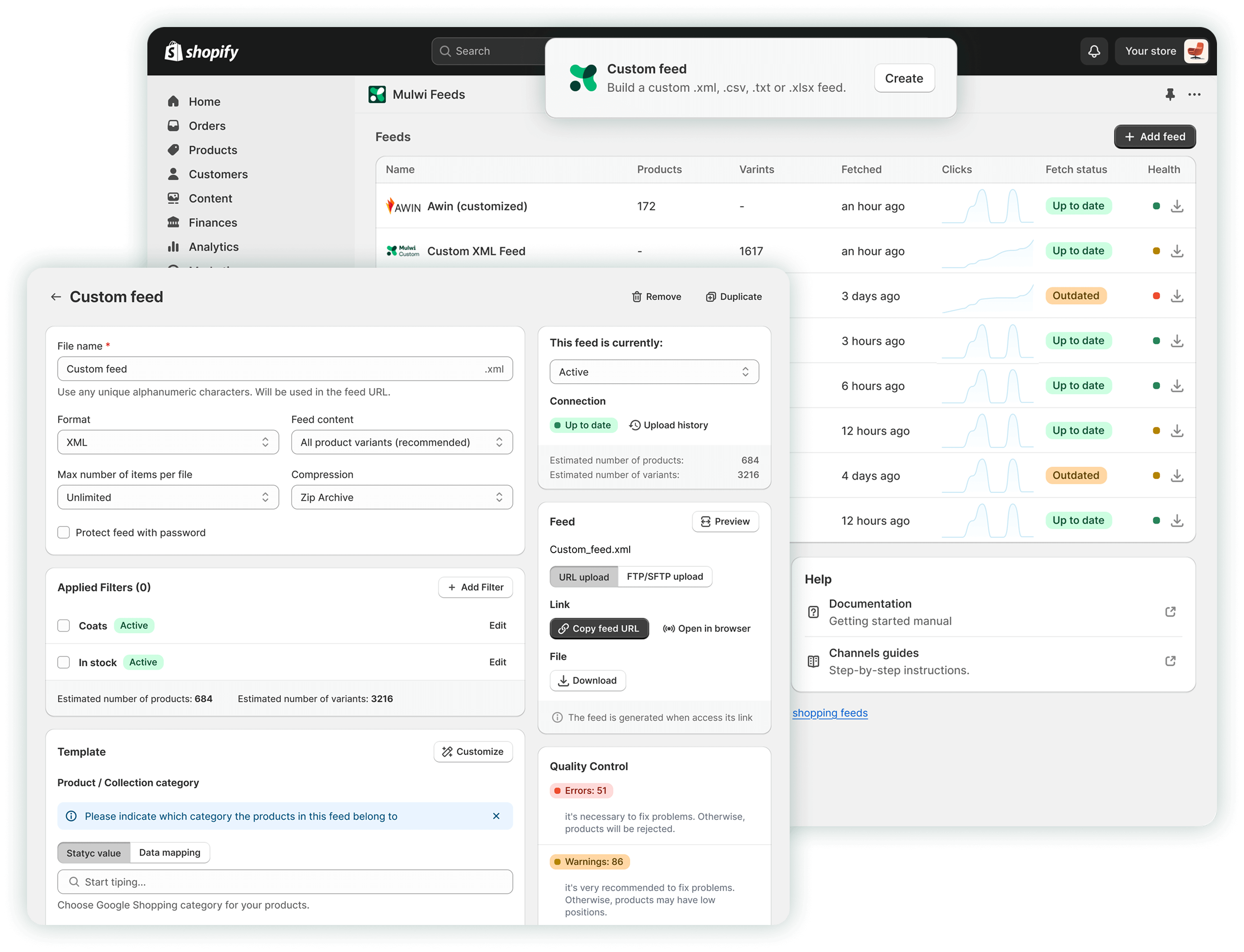
  2. Create a new feed. In your Shopify admin dashboard, go to Apps > Mulwi Feeds > Feeds and click the “Add Feed” button.
  3. Select a feed template. Click on “Show all feeds” and pick a template for your preferred platform from our list of pre-installed options. You can also create a custom XML, CSV, TXT, or XLSX feed.
  4. Add information to your feed. Let customers know everything about your products. Use Shopify markets and feed translation to talk with customers in their language. Include your custom metafields to tell even more. Don’t forget to map product categories with those the platform uses and filter out the products you don't need.
  5. Save and review your feed. Finally, click the “Save” button to create your new Shopify product feed. Be sure to check the "Quality Control" section to see if there are any issues with your feed that need to be fixed.

What benefits can you get from using a Shopify product feed?

It’s only natural to think about benefits before taking risks. Here are several reasons why you should use a product data feed on Shopify:

Consistency across platforms

Feeds accurately represent your products across all your various sales channels, reducing inconsistencies with your actual inventory. This uniform product data also prevents customer confusion.

Improved listing visibility

Detailed Shopify products feed data helps your offerings appear more frequently in relevant search results and advertising spots, connecting your items with those who are most likely to purchase them.

Better product performance

In addition to more impressions, an optimized Shopify product feed increases conversions too. Feed’s engaging information drives shoppers to not just look at your products but to click on and buy them.

More time for your business

A Shopify product feed app automates most tasks, freeing you from human errors and hours wasted on monotonous routines. An app takes care of your product feeds, while you fully focus on your store.

Orders import

Product feed apps flexibly adapt to catalogs of any scale and complexity, providing universally effective management of Shopify product data feeds for small local shops, mid-size stores, and large enterprises.

Connect your store to the world’s major marketplaces today?

Mulwi shortened the distance between your store and the world’s major marketplaces – now you’re just a single file away! All you need to do is decide how to submit your product feed to the marketplace:

  • You can share your Shopify product feed URL. This is the easiest way. You connect your feed once and then it’s regularly updated on its own.
  • If you’re more tech-savvy, you can set up an SFTP connection. It’s similar to the URL method, but with extra security and more frequent feed updates.
  • You can manually upload the feed from your computer. An old-fashioned, yet reliable way. However, you will need to upload the new feed each time your products change.

Why wait any longer? Install Mulwi Shopping Feeds to organize your Shopify product feeds, grow your business, and start boosting your sales today!


FAQ

What support options does Mulwi provide?
Can I customize my Mulwi product feeds?
How can I troubleshoot issues with my Mulwi product feed?
How often are Mulwi product feeds updated with changes in my Shopify store?
Does Mulwi change anything in my Shopify store?
Can I add product variants in the Mulwi feed?
Can I choose which products to add in the Mulwi feed?
There is no Mulwi feed template for my sales channel.